Inventory & equipment under control
Who did we give what to? In bolzn you manage kit sets, balls, bibs, cones and first aid kits in one place: how much is in stock, who received what and what has come back – no notes in the kit bag.
Inside the Inventory feature
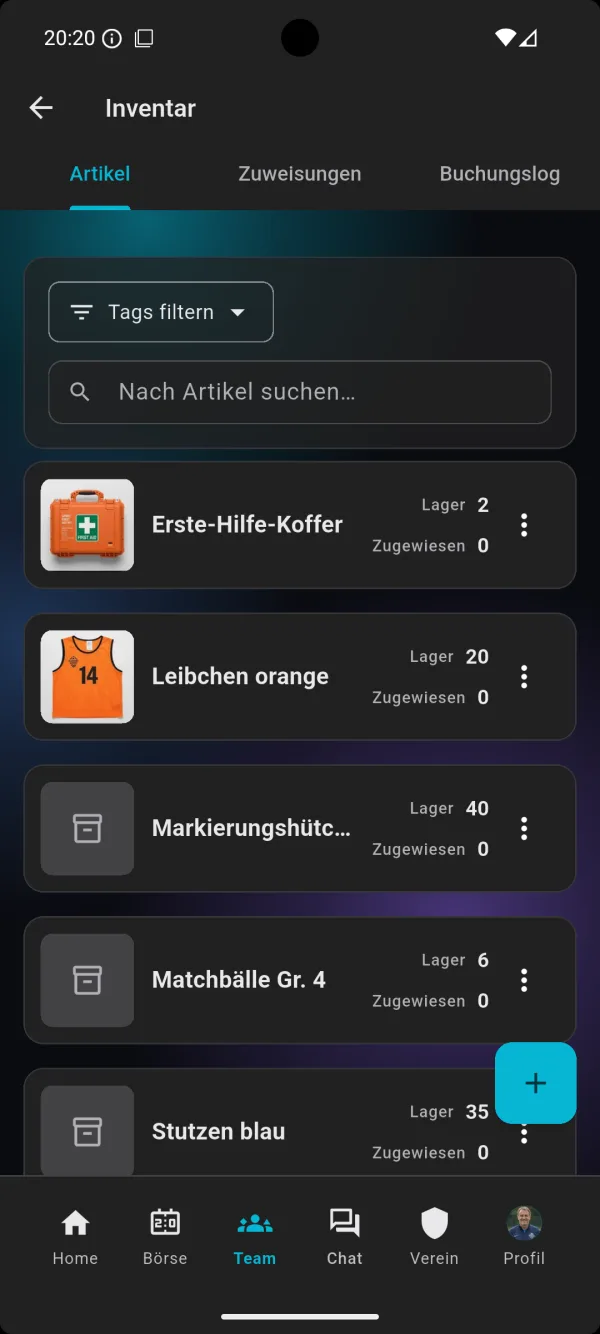
Items and stock
Create every item with a name and photo – from the home kit to size 4 match balls and marker cones. For each item you see how many are in stock and how many are currently issued to members. Tags and search help you find any item in seconds.
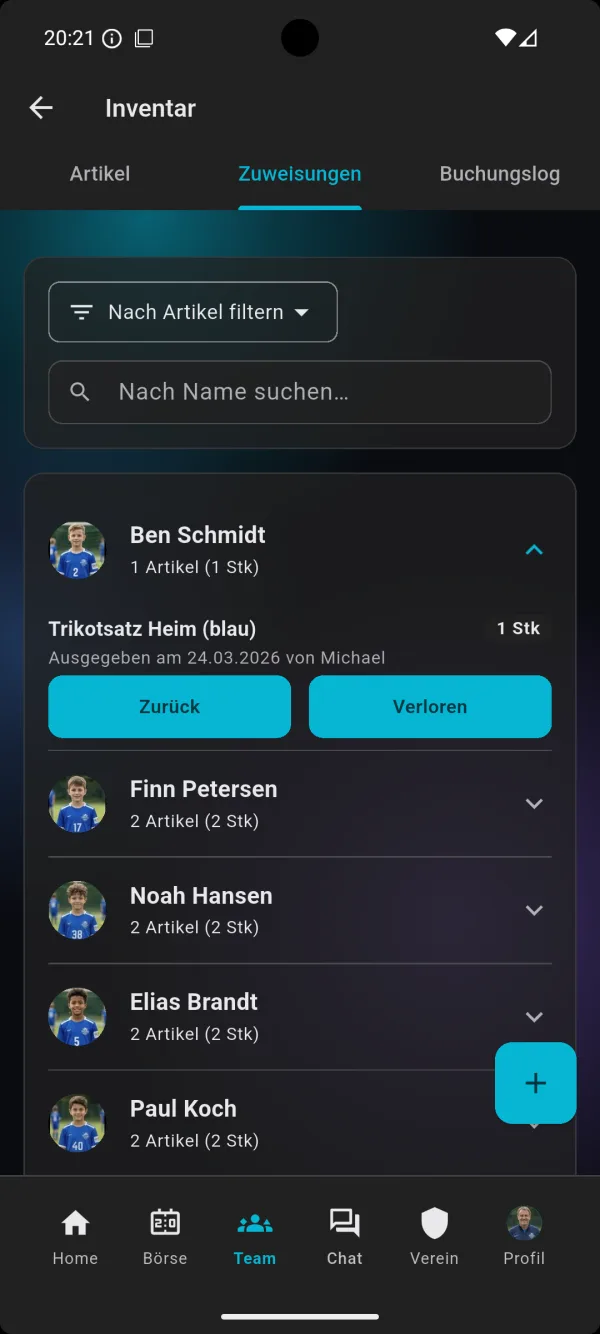
Issuing to members
When a player gets their shirt or a tracksuit, you record the issue with the quantity. The assignments then show for each member which items they have, when they were issued and by whom. That answers “Who still has the second ball bag?” in no time.
Returns and losses
When something comes back, you tap “Return” – the stock goes up automatically. If an item is gone, you mark it as “Lost” and can add a note. That keeps the stock right, even when a shirt doesn't come back.
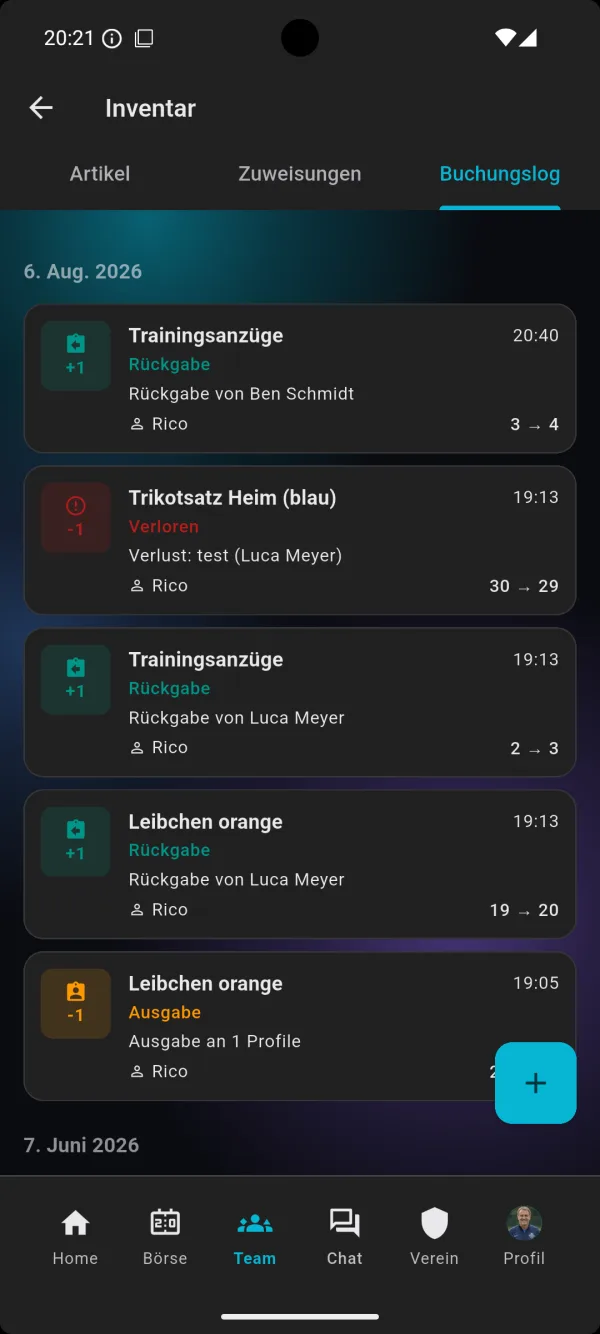
Activity log
Every movement lands in the activity log with date, time and name: issue, return and loss, each with the stock before and after. Anyone doing a stocktake at the end of the season can see exactly what happened when.
How it works in three steps
1. Create items
Open the inventory area in your team and add what you have: kit sets, tracksuits, balls, bibs, socks, cones. Enter the stock and add tags so you can filter quickly later.
2. Issue equipment
When a player takes something, you record the issue against their profile. The stock goes down, and the assignments show straight away who has what.
3. Take it back
At the end of the season or after the tournament you take the equipment back – or mark missing items as lost. The activity log records every movement.
For coaches, team staff and kit managers
Coach
You want to know before training whether there are enough bibs and balls, rather than finding out on the pitch. Because the inventory is part of bolzn, it sits right next to training plans, matches and the team kitty – one app instead of another list.
Team staff and kit managers
Hand out kit sets, collect them after the match, keep track of losses: with assignments per member and the activity log you no longer need to remember who you gave what to. Even when several people hand things out, every transaction can be traced by name.
Players and parents
Clarity for families too: whatever was issued is documented. At the end of the season it is clear what still needs to come back, and nobody has to wonder whether the shirt has already been returned.
The inventory on video
In two and a half minutes, the tutorial shows how to manage the inventory in bolzn – creating items, issuing them to members and taking them back.
You can find more guides in the Tutorials on the home page and on our YouTube channel.
Frequently asked questions
Does the inventory cost extra?
No. The inventory is part of the bolzn team plan at no extra charge – together with training planning, tactics board, team kitty, match finder, live ticker and polls. You can try it free for the first 3 months; for all prices see Pricing.
Which items can I manage?
Everything your team owns: kit sets, tracksuits, socks, bibs, balls, marker cones or the first aid kit. Every item gets a name, a stock level and, if you like, a photo and tags.
Can I see who has which equipment?
Yes. The assignments show for each member which items were issued in what quantity, when and by whom. You can filter by item or search for a name.
What happens if something gets lost?
You mark the item as lost in the assignment and can add a note. The stock is adjusted and the loss appears in the activity log with date and name.
Is there an inventory for the whole club?
Today the inventory belongs to a team. According to our pricing page , a club inventory for the whole club is in preparation for the club plan.
Try the inventory free for 3 months
Add your equipment in a few minutes and keep track from now on. Ad-free and cancel monthly.
Try free for 3 months→